Checking for new data updates
In some cases, Pipl allows caching of search results as long as you’re a paying customer, you may end up looking for the best way to update that cache. This may be useful for getting the most recent contact information of an individual or finding up to date knowledge of an individual in an investigation. This document explains a strategy to do so, and provides best practices for such data update requests.
Index updates
Pipl updates its data index periodically with new data coverage. All administrators of an API account will be informed of data index updates.
Recommended time frame
❗️ Maximum Update Frequency
The recommended timeframe to check for updates of data is three months from each request, or once there has been an update to the index - whichever comes first. Please do not query for updates more frequently than every 3 months as you will not see any significant changes to profiles in between index updates and these requests will bog down our system from other requests. Pipl considers too frequent update checks to be an abuse of our API platform.
There are certain things to consider with regards to what data fields would change over time for an individual. For example:
- An individual may keep a personal email address for a long time, but if they switch jobs they’ll get a new work email address.
- The time period that the average person stays at a job should be considered.
- Some data may not change very often, such as the person’s phone number.
The strategy
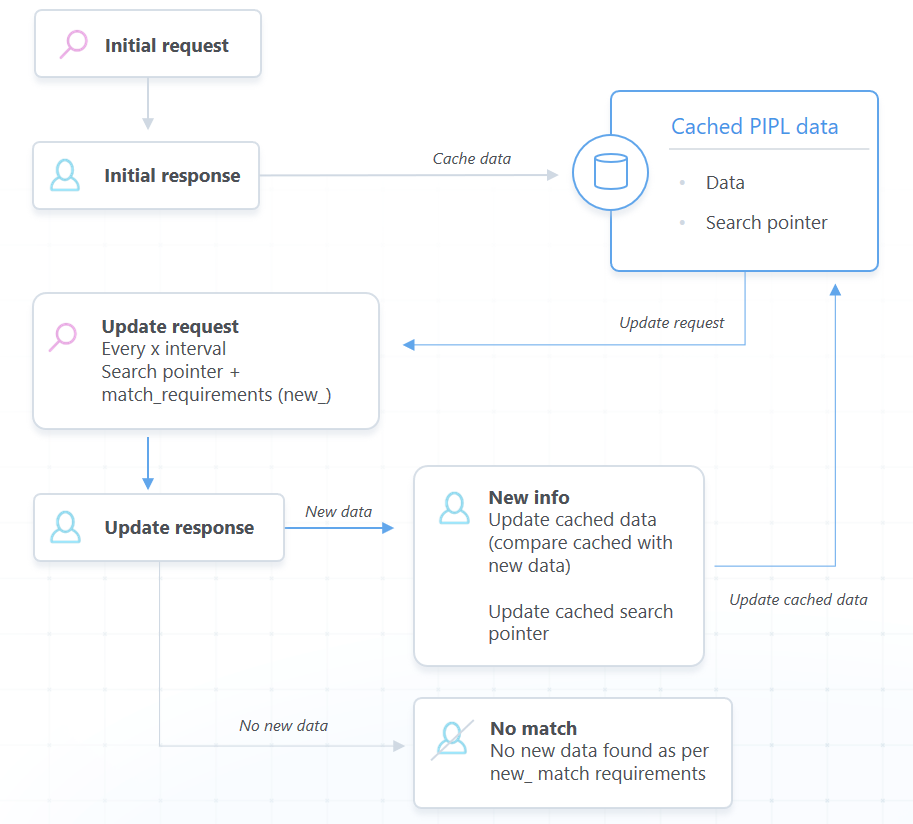
It is recommended to cache the search pointer of the person you’re saving into your cache, as it’ll be used to check for any new information.
After the recommended time frame, should you wish to check for updates, you should make use of the following API mechanisms:
- Query the API by search pointer, using the search pointer you have cached.
- Use the new_ feature of the match_requirements query parameter (see match criteria), to specify which data fields you’re looking to update (costs can be reduced by requiring important updates, such as new emails/jobs).
- Use minimum_match=1.0 to make sure that you are still getting a single matching profile.
Should the response have no new information of the data types you’ve specified, you’ll get a non-matching response (with no person or possible_person appearing in the response), and you won’t be charged.
If there is updated information, a new Person will be returned, which will contain the up-to-date information we have about that individual. For example, if your match_requirements criteria was ‘new_email’, you will want to compare the cached emails with the new emails, to see which is (are) the new email(s) that was (were) received.
In most cases, you’ll want to simply replace your current cache with the new response, including the new search pointer.